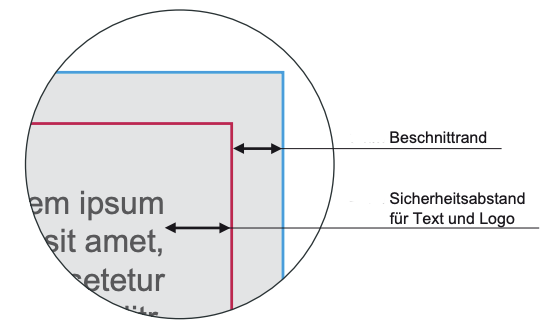
Trimmed margin
What is the trim edge?
A print-ready file must always include a bleed area in addition to the actual finished size. The minimum bleed is usually 2 mm; we require 3 mm on each side. For this reason, our data sheets distinguish between the finished size and the artwork size. The finished size is the final size of the product after it has been fully produced and trimmed. For example, a CD booklet has a finished size of 120 × 120 mm (12 × 12 cm).
The artwork size is the size of the file we require for printing, including the bleed. With 3 mm bleed on each side, the artwork size is therefore 126 × 126 mm.
Why is bleed required?
A CD booklet, for example, is printed on a much larger sheet of paper. Afterwards, the booklet or the individual pages are cut out of this larger sheet. Even though modern cutting machines are very precise, there are still small cutting tolerances. You can compare this to cutting something out with scissors: imagine you have an exactly 120 × 120 mm black square printed on a white A4 sheet. If you tried to cut exactly along the edge of the black square, it would be almost impossible to avoid slipping slightly at some point. As a result, small white edges or “white flashes” could become visible. This is why the background colour or design must extend beyond the actual trim line. If the cut is slightly off, the area outside the finished size still contains the same colour or artwork, preventing unwanted white edges.
It is therefore important that the bleed area contains a continuation of the same background colour, image or design as the main artwork. For example, if your design contains a meadow or grass background, the image should not stop at the 120 mm trim line. It should continue another 3 mm beyond the trim line on every side. Professional design programs usually allow you to define a bleed area directly. This means you can create the document at the actual finished size of 120 × 120 mm, while the exported print file, including bleed, will have an artwork size of 126 × 126 mm.
The important thing is that all background colours, images and other elements that are intended to reach the edge of the finished product must extend beyond the finished size and all the way into the bleed area.
If you are unsure
Please feel free to contact our team if you have any questions. Our proofs always show the exact cutting/trim line in red. You will usually see additional artwork outside this red line, this is the bleed area. If this area is white or does not contain a continuation of your background colour or image, this can cause problems during trimming. If the bleed area is completely white, we will normally point this out to you. However, if you have filled the bleed area with a different colour that more or less matches the design, we will assume that this was an intentional choice and that you were unable to extend the original background or artwork any further.